Advertising disclosure: this page contains one advertising (affiliate) link, to Make, marked next to the link. If you sign up through it we may earn a commission at no extra cost to you. Make has been our affiliate partner since 2026-08-22; the tests and the conclusions on this page predate that and have not been changed since. Every other product link on this page is a plain link.
Tally to HubSpot to follow-up: a tested client-intake workflow for solo consultants
Tested on 2026-08-16 in two rounds, on the free tier of every tool. This is not a feature tour. We built the workflow, ran ten scripted test cases across the two rounds (including two deliberate duplicates and two forced failures, plus build-phase smoke tests), counted the operations, and verified the acknowledgement emails from the receiving inbox by message ID. The evidence and the exported workflow are linked on this page.
The problem this solves
A lead fills your contact form. The notification lands in your inbox, you are with a client, and by evening it is buried. No CRM record, no reply sent, no follow-up scheduled.
The workflow below automates the first mile: a form submission becomes a CRM contact with a deal attached, and the lead gets an acknowledgement email. In our tests the whole chain ran in about one second per lead. The failure modes further down describe the cases where it does not, read them before trusting it with real leads.
The stack we tested
All plans and limits checked on 2026-08-16 unless noted.
| Role | Tool | Plan | Monthly cost |
|---|---|---|---|
| Form | Tally | Free | 0 EUR |
| Automation | Make (advertising link: Make) | Free, 1,000 credits/mo (terminology checked 2026-08-18; simple operations consume 1 credit each) | 0 EUR |
| CRM | HubSpot | Free CRM | 0 EUR |
| Acknowledgement email | Brevo | Free, 300 emails/day | 0 EUR |
What the workflow does
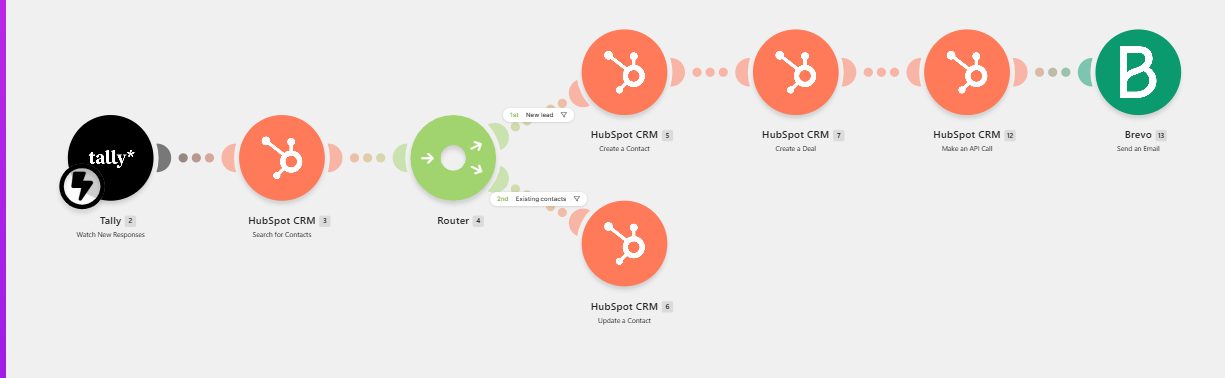
- Tally receives the form submission (name, email, company, service interest, budget, message)
- Make searches HubSpot for the submitter's email address
- Router: if the email is new, create a contact, create a deal in the first pipeline stage, link the deal to the contact, and send an acknowledgement email via Brevo. If the email already exists, update the contact and stop. At normal submission pace this produced no duplicate records and no duplicate emails in our tests; see the race window below for the exception.
One detail that surprised us: Make's "Create a Deal" module has no way to link the deal to the contact (we went through its full property list). We had to add a raw HubSpot API call for the association; the exact call ships in the downloadable blueprint below. Without it, deals float in your CRM disconnected from the people they belong to.
What we measured
- The full chain works. New-lead cases completed end-to-end in both rounds: contact, deal, association, and acknowledgement email. Round 2 also surfaced a real failure (the race window below), which we count as a result, not a footnote.
- Delivery verified from the receiving inbox. The acknowledgement arrived in the Gmail inbox (not spam), personalized with the lead's name, in both rounds. We logged the Gmail message IDs so the verification can be repeated.
- A new lead consumes 6 Make credits; a duplicate consumes 3. At the free 1,000 credits per month that is roughly 160 new leads of monthly headroom.
- Duplicate protection held at normal pace. An identical resubmission ~50 seconds after the original created no second contact, deal, or email, and took the short 3-credit path.
- Special characters survive. A test lead named Søren Ø'Brien-Kärkkäinen with a company called Åland & Partners Oy came through intact into HubSpot.
What breaks, honestly
We forced failures on purpose in both rounds, and round 2 handed us one for free. Three sharp edges, each observed at least twice:
- Failures are silent and partial. When a mid-workflow step fails, the contact and deal are already created but the acknowledgement email never sends. Your CRM looks fine. The lead waits for a reply that is not coming. (Observed in both forced-failure runs, identical HubSpot 400 responses.)
- One error shuts down the whole automation. Make deactivates an erroring scenario by itself. Every lead after that queues up unprocessed until a human reactivates the scenario. In our test the queue then flooded in all at once. (Observed twice.)
- Duplicate protection has a race window. HubSpot's search index lags contact creation by a few seconds. Two submissions of the same email seconds apart can slip past the search check; HubSpot's own uniqueness rule then rejects the duplicate, but as an error, which triggers edge number 2. (Observed once, during a queue drain that replayed submissions back to back.)
If you run this stack with real leads, add an error-notification route in Make and check the scenario regularly; we suggest weekly as a starting point (our judgment, not a tested interval). We treat these edges as the price of a free stack, not a reason to avoid it.
Build it yourself
Setup took us about an hour of focused work across form fields, module mapping, and the association API call (estimated from our build log; your pace will vary). The exact scenario is available as a Make blueprint export: import it, connect your own Tally, HubSpot, and Brevo accounts, and adjust the form field IDs.
Download: client-intake-v1.blueprint.json (final link lands here when the template
page is live; the file is in the evidence pack meanwhile).
Two setup notes that cost us time so they do not cost you any:
- Make refused to send email through a personal @gmail.com address on both connection types we tried (plain SMTP and Make's restricted Google OAuth). Make's documentation points to a custom Google Cloud OAuth setup as the remaining route; we did not test it and used a transactional service (Brevo) instead, which is the better practice anyway.
- Make's "Run once" does not save your scenario. Save explicitly before closing the browser, or you will rebuild modules like we did.
Who this is for, and who should skip it
Good fit (our assessment based on the measured capacity, not a survey): solo consultants and 1-5 person agencies whose inbound volume sits comfortably under the ~160 new leads per month the free tier supports, with no dedicated ops person and a tolerance for checking one dashboard regularly.
Skip this stack if: you only need form-to-contact capture with no deal creation or custom acknowledgement. HubSpot's own free form builder (checked 2026-08-18) does that natively with zero automation tooling, and one less thing to break. Also skip it if a missed acknowledgement is unacceptable in your business (see the failure modes above), or if you are already on a paid CRM with built-in intake automation.
The non-affiliate alternative: self-hosted n8n (Community Edition, checked 2026-08-18) replaces Make with no software subscription fee and no operations cap. You pay with your own hosting, maintenance, and time instead; we have not tested this route.
The claims on this page map to the page's claim ledger, which ties each one to a test artifact (run histories, screenshots, Gmail message IDs) or a dated external source. Evidence pack: client-intake-v1, tested 2026-08-16 in two rounds including two forced-failure runs. Pricing and program terms rechecked on the dates shown.